TextVocal Download
TextVocal app icon

TextVocal: Smart Text to Audio Converter

Aldritch G. Felipe
Tools · Text to speech

Turn your text into speech. Type it, tap once, and listen. Simple, fast and convenient.

5.2 MBSize
1.0Version
FreePrice
AndroidPlatform
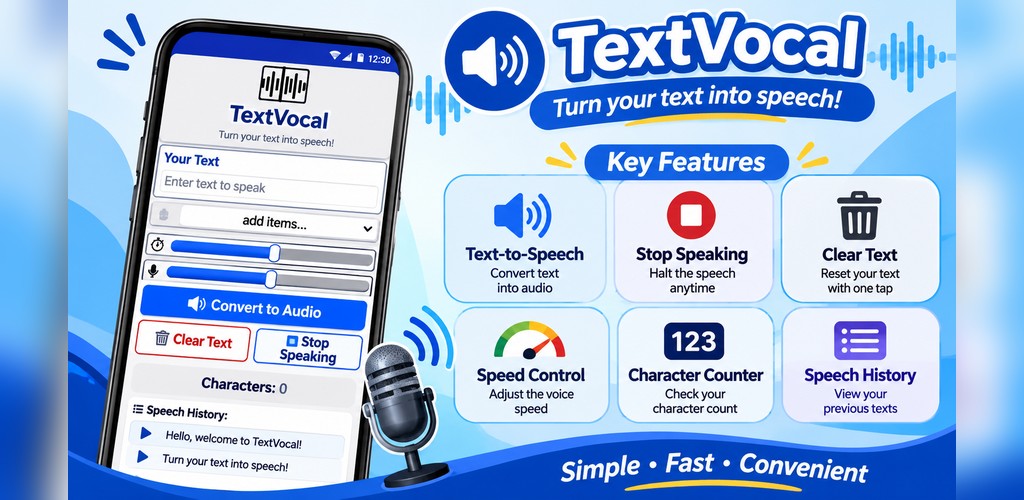
TextVocal feature graphic: text to speech, stop speaking, clear text, speed control, character counter and speech history
Preview

See TextVocal in action

A clean, single-screen interface: type your text, pick your speed and tap Convert to Audio.

About this app

Turn Your Text into Speech!

TextVocal is a simple and convenient text-to-speech application that converts written text into spoken audio. It allows users to enter text and listen to it through voice output, making reading and listening easier and more accessible.

Whether you want to listen to written content, practice pronunciation, or enjoy a convenient way of consuming text, TextVocal provides an easy-to-use interface designed to make text-to-speech conversion simple and enjoyable.

Updated on Nov 7, 2026

ToolsText to speechAccessibilityStudy helper
Key features

Everything you need to listen to your text

Six simple tools that make text-to-speech easy for everyone.

Text-to-Speech Conversion

Convert written text into spoken audio with just one tap. Enter your text and let TextVocal read it aloud.
Stop Speaking

Stop the current speech whenever you want. Full control over audio playback, anytime.

Clear Text

Remove your entered text with one tap and start a new conversion right away.

Speech Speed Control

Adjust the speaking speed to your listening preference for a more comfortable experience.

123

Character Counter

Keep track of how many characters are in the text box while you type.

Speech History

View previously converted text and easily review your earlier entries.

How to use TextVocal

From text to voice in eight easy steps

No account, no setup. Open the app and start listening.

Open the TextVocal application.

Enter the text you want to convert into speech.

Select your preferred voice option, if available.

Adjust the speaking speed according to your preference.

Tap Convert to Audio to hear your text.

Use Stop Speaking to stop the audio.

Use Clear Text to remove your current text.

Check the character counter and speech history whenever needed.

Why choose TextVocal?

Designed for a smooth, convenient experience

  • Simple and user-friendly interface
  • Convenient text-to-speech conversion
  • Easy-to-use speech controls
  • Adjustable speaking speed
  • Character counting feature
  • Speech history for reviewing previous text
Who can use TextVocal?

Made for students, teachers, professionals and everyone

🎓Students who want to listen to written notes
🍎Teachers who need spoken versions of text
🎧Users who prefer listening instead of reading
🗣️Anyone practicing pronunciation
Download & install

Get TextVocal on your Android phone

TextVocal is distributed as an APK file. Follow the steps below to install TextVocal.apk in under a minute.

TextVocal.apk

Free · Android · by Aldritch G. Felipe
TextVocal.apk
Download TextVocal.apk
  • Version1.0
  • File size5.2 MB
  • Packageappinventor.ai_aldritch_g_felipe_cyn.TextVocal
  • SHA-25696864523ed26aad07dcaead7616ceab278d63b86c54c320de6455a541c9d8cf2

Installation instructions

  1. Download the fileTap Download TextVocal.apk. If your browser warns that the file type can be harmful, choose Download anyway.
  2. Open TextVocal.apkTap the finished download, or open Files → Downloads and tap TextVocal.apk.
  3. Allow installationIf asked, tap Settings and switch on Allow from this source (also called Install unknown apps) for your browser or file manager, then go back.
  4. Tap InstallIf Google Play Protect shows a notice, tap More details → Install anyway.
  5. Open & enjoyTap Open, type your text and press Convert to Audio.
Tip: after installing, you can turn “Install unknown apps” off again in your phone settings. To update later, just download and install the newest TextVocal.apk over the old one.

Data safety

  • We don’t collect or sell your personal data.
  • No account, sign-up or login required.
  • Your text and speech history stay on your device and can be cleared at any time.
Read the full Privacy Policy →

App info

Offered byAldritch G. Felipe
Version1.0
Updated onNov 7, 2026
Size5.2 MB
CategoryTools
RequiresAndroid 5.0 and up
PermissionsInternet
Developeraldritchfelipe@gmail.com
Privacy policytextvocal.iamaldritch.online/privacy.html

Questions or feedback?

TextVocal is made by Aldritch G. Felipe. Reach out for support, bug reports or ideas for new features.

Email the developer
TextVocalFree · 5.2 MB · APK
Download